Fast Cheap Web Hosting
  • 0 Shopping Cart
  • Home
  • Store
    • Browse All
    • FCWH: Hosting Plans
    • FCWH: Hosting & Website
    • Register a New Domain
    • Transfer Domains to Us
  • Announcements
  • Knowledgebase
  • Network Status
  • Contact Us
  • More
  • Account
    • Login
    • Register
    • Forgot Password?
  1. Portal Home
  2. Knowledgebase
  3. Email
  4. How To Setup Your Email In Outlook

  Categories

Backup/Restore
4
cPanel - Control Panel
5
DNS - Nameservers
2
Email
9

  Categories

  Support

My Support Tickets
Announcements
Knowledgebase
Downloads
Network Status
Open Ticket

How To Setup Your Email In Outlook Print

  • 0

1. Open Outlook

2. Click File


3. Click Add Account


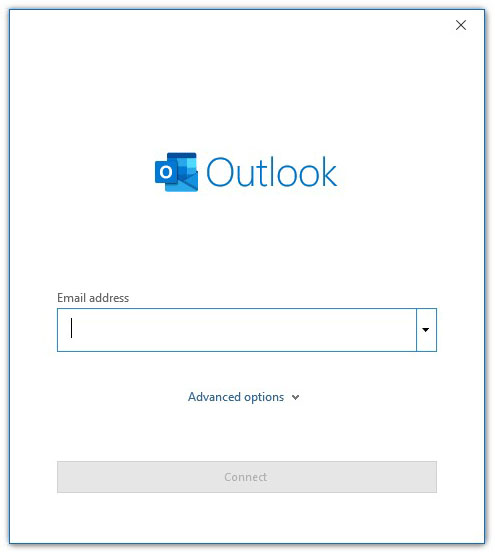
4. Enter the email address you wish to set up then click Connect


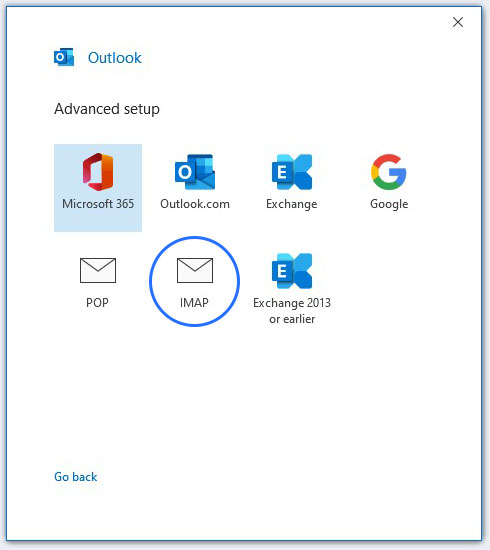
5. Click the IMAP icon


6. Enter the server settings for the email account and click Next.

These settings can be found in your cPanel account.
Log in to your cPanel account > Click emails > Click Email Accounts > Click Connect Devices


7. Enter the password for the email account and then click 'Connect'


Was this answer helpful?

Related Articles

How to Create an Email Account in cPanel? To create a new email address, perform the following steps:1. Log into your cPanel account.... How to change the password of your email account? If you want to change the password of your email account, you can do this through the... How to Access your Email Account from cPanel Webmail? You can access your Email account directly from Webmail.1. Open http://example.com/webmail,... How to create an E-mail Autoresponder when you are unavailable or on vacation? If you are going for a holiday or will be unavailable for few days or a month, you can create... Microsoft Outlook 2013/2016 email setup tutorial Before starting, you will need to create an email account in cPanel if one does not already...
« Back

  Support

My Support Tickets
Announcements
Knowledgebase
Downloads
Network Status
Open Ticket
  • Contact Us
  • Terms of Service

Copyright © 2026 Fast Cheap Web Hosting. All Rights Reserved.


Loading...
Loading...

Generate Password

Please enter a number between 8 and 64 for the password length